Nut and Washer Schedule
- General Overview
- Related Tools
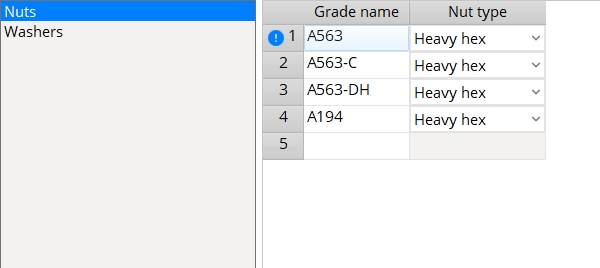
Nuts
|
heavy hex 
|
heavy square 
|
jam 
|
- Currently the only way to track the grade that has been assigned to a particular nut is to refer to the Primary nut grade or Secondary nut grade on the Bolt Edit window.
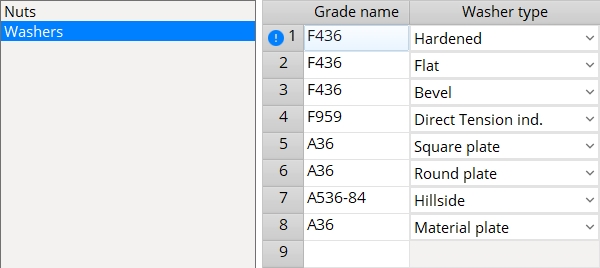
Washers
- Supported washer types are Hardened or Square plate or Round plate or Flat or Bevel or Direct tension indicator or Hillside.
| hardened | square
plate |
round
plate |
flat | bevel | direct tension indicator | hillside | heavy
plate |
double thick hardened |

|

|

|
|

|
|

|

|

|
- Washer types are assigned to bolt types in Washer Settings. The first grade that you enter for a washer of a particular type (on this window, not in Washer Settings) is the grade that is assigned when connections are designed and bolts are added through matching holes. It is also the grade that is applied for a particular bolt type when you Add Bolts or Add Bolts to Single Ply or Add Point to Point.
- For example, if the Washer Settings window designates that Flat washers be used for a particular bolt type and the first material that is listed on this window for Flat washers is F436, then that F436 is the material of that washer.
- Any material that has been entered for a selected type (Hardened or Bevel or Load or etc.) can be selected on the list box
( for a washer of that Grade on the Bolt Edit window. This allows you to use washers of the same type, but different grades, in the same Job. )

|
|


Note: When you select the Load dropdown, it lists the forms stored in the corresponding settings folder.
OK (or the Enter key) closes this screen and applies the settings.
Cancel (or the Esc key) closes this screen without saving any changes.
Reset undoes all changes made to this screen since you first opened it. The screen remains open.
- Bolt Specifications (to create new bolt types)
- Nut Grade (to assign a nut grade to a bolt type on the Bolt Specifications)
- Washer Settings (to assign washers to bolt types)
- Primary nut grade (to assign a nut grade to a user-edited bolt)
- Secondary nut grade (to assign a nut grade to a user-edited bolt)


